
A step into the world of ar
Augmented Reality (AR) is transforming how we interact with digital content, making it more immersive and interactive. AR.js, a lightweight open-source library, allows developers to create AR experiences directly in the browser, eliminating the need for additional app installations. In this post, I’ll share my journey of creating an animated AR experience for my university’s inauguration display, a project that, despite its challenges, taught me a lot about AR.js and browser-based AR development.
Why AR.js?
AR.js is a fantastic tool for creating AR experiences due to its versatility and accessibility. It supports multiple tracking methods:
- Marker tracking: Uses predefined markers to anchor AR content.
- Image tracking: Tracks and displays AR content on specific images.
- Location tracking: Anchors AR elements based on GPS data.
However, AR.js does not support SLAM (Simultaneous Localization and Mapping), which is crucial for keeping AR objects stationary relative to the real-world environment when markers are no longer visible. This limitation posed a significant challenge during my project.
My Project Goals
The project aimed to:
- Create a 3D animation using Blender and export it as a
.glbfile. - Display the 3D animation anchored to a marker using AR.js.
- Play a video texture within the animation for added interactivity.
While these goals seemed straightforward, the journey was filled with obstacles and learning moments that inspired me to document the experience.
Exploring AR.js
Code Snippet: Marker-Based Tracking
Here’s a simple code snippet to get you started with AR.js, similar to what I tried when I first learned about AR.js. This example demonstrates marker-based tracking, where AR content is anchored to a predefined marker. You can create your own marker pattern using the AR.js Marker Training Tool.
<!DOCTYPE html>
<html>
<head>
    <script src="https://aframe.io/releases/1.2.0/aframe.min.js"></script>
    <script src="https://cdn.jsdelivr.net/gh/jeromeetienne/ar.js@2.2.1/aframe/build/aframe-ar.min.js"></script>
</head>
<body style="margin: 0; overflow: hidden;">
    <a-scene embedded arjs="debugUIEnabled: false;" vr-mode-ui="enabled: false">
        <a-marker id="marker" preset="custom" type="pattern"
            url="/path/to/your/pattern.patt" smooth="true" smoothCount="10" smoothTolerance="0.01" smoothThreshold="2">
            <a-box id="model" position="5 0.5 0" material="color: red;" data-raycastable></a-box>
        </a-marker>
        <a-entity camera></a-entity>
    </a-scene>
</body>
</html>
I also experimented with NFT image tracking and events like devicemotion and deviceorientation. While I could stop AR objects from disappearing after the marker was out of sight, keeping them stationary relative to the real environment without SLAM proved nearly impossible. Thus, I decided to stick with marker-based tracking for simplicity and reliability.
The Disaster Moment
Most of my time was spent creating a 3D animation in Blender, a challenge, as I’m not a 3D artist. With help from friends, I crafted an animation and exported it as a .glb file. Everything seemed ready to go… or so I thought.
When I loaded the .glb file into AR.js, the object appeared, but the animation was missing! A quick investigation revealed that while Blender successfully exported the animation, AR.js didn’t fully support .glb animations. Time was running out, and I had to find a workaround fast.
Finding a Workaround
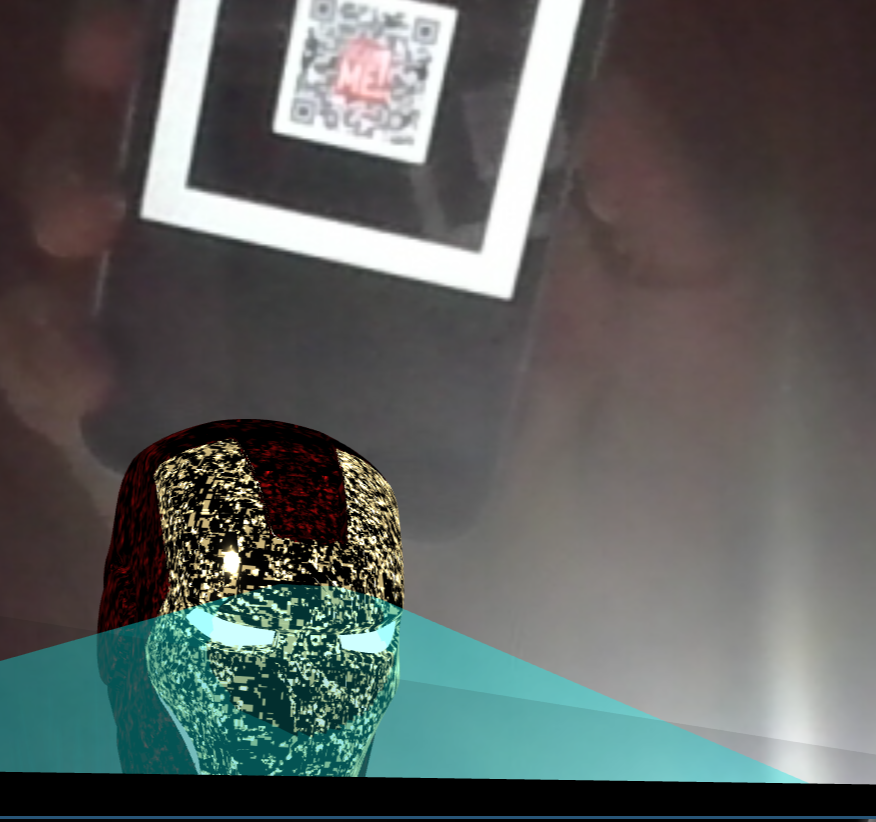
To overcome the animation limitations of AR.js, I integrated it with Three.js, enabling marker tracking alongside advanced animations. AR.js was used solely for detecting the marker and providing its position and orientation in 3D space using a dummy object. I then used this data to place and synchronize my animation in Three.js, allowing precise control over movement and rendering.
This approach provided the best of both worlds, AR.js for efficient marker-based tracking and Three.js for rich animations and effects. The result was a seamless experience where the marker remained the anchor, but the animations were no longer constrained by AR.js’ capabilities. It was a true “Eureka!” moment for me, unlocking exciting new possibilities for web-based AR development.
Code Snippet: AR.js and Three.js Integration
<!DOCTYPE html>
<html lang="en">

<head>
    <meta charset="UTF-8">
    <meta name="viewport" content="width=device-width, initial-scale=1.0">
    <title>AR.js with Three.js</title>
    <script src="https://aframe.io/releases/1.2.0/aframe.min.js"></script>
    <script src="https://cdn.jsdelivr.net/gh/AR-js-org/AR.js@3.3.2/aframe/build/aframe-ar.js"></script>
    <script type="importmap">
        {
          "imports": {
            "three": "https://cdn.jsdelivr.net/npm/three@latest/build/three.module.js"
          }
        }
    </script>
    <style>
        body {
            margin: 0;
            overflow: hidden;
        }
    </style>
</head>

<body>
    <!-- AR.js Scene -->
    <a-scene embedded arjs>
        <!-- Marker -->
        <a-marker id="marker" preset="custom" type="pattern" url="/assets/ar/pattern-Untitled.patt" smooth="true"
            smoothCount="0" smoothTolerance="0.0005" smoothThreshold="1.5" preload="true">
            <!-- Pseudo-object for positioning -->
            <a-entity id="pseudo-object" geometry="primitive: box; height: 0.1; width: 0.1; depth: 0.1"
                material="color: red" position="0 0.05 0"></a-entity>
        </a-marker>

        <!-- Camera -->
        <a-entity camera></a-entity>
    </a-scene>

    <script type="module">
        import * as THREE from 'three';
        import { GLTFLoader } from 'https://cdn.jsdelivr.net/npm/three@0.152.2/examples/jsm/loaders/GLTFLoader.js';

        // AR.js and Three.js Integration
        window.addEventListener('DOMContentLoaded', () => {
            console.log('AR.js and Three.js are ready.');
            const pseudoObject = document.querySelector('#pseudo-object');

            // Set up Three.js scene
            const scene = pseudoObject.object3D;
            const loader = new GLTFLoader();

            let mixer; // For animations
            let model; // To store the loaded model

            // Load the GLB model
            loader.load('/path/to/glb/file.glb', (gltf) => {
                model = gltf.scene;
                model.position.set(0, 0.2, 0); // Adjust relative position
                model.scale.set(0.5, 0.5, 0.5); // Adjust scale if needed
                scene.add(model);

                // Animation mixer setup
                if (gltf.animations && gltf.animations.length) {
                    mixer = new THREE.AnimationMixer(model);
                    gltf.animations.forEach((clip) => {
                        const action = mixer.clipAction(clip);
                        action.play();
                    });
                }
            }, undefined, (error) => {
                console.error('An error occurred while loading the model:', error);
            });

            // Animation loop
            const clock = new THREE.Clock();
            function animate() {
                requestAnimationFrame(animate);

                // Update the animation mixer
                if (mixer) {
                    const delta = clock.getDelta();
                    mixer.update(delta);
                }

                // Update model position based on marker position
                if (model) {
                    const pseudoObject = document.querySelector('#pseudo-object');
                    const pseudoPosition = pseudoObject.object3D.position;
                    const pseudoRotation = pseudoObject.object3D.rotation;

                    model.position.copy(pseudoPosition);
                    model.rotation.copy(pseudoRotation);
                }
            }

            animate();
        });
    </script>
</body>

</html>
Video Texture Limitations
Blender couldn’t export .glb files with embedded video textures. I programmatically assigned the video as a texture to a plane in Three.js. While this worked on desktop, it failed on mobile devices due to browser limitations.
Final Hours
With hours left before the deadline, I considered alternative approaches like dynamically displaying the video separately. However, the results were far from perfect, and I had to abandon the project due to time constraints.
Lessons Learned
- Plan for limitations: Understand the capabilities and constraints of the tools you’re using.
- Iterate quickly: Test each step early to avoid last-minute surprises.
- Leverage the community: Resources like documentation, forums, and peers can save valuable time.
- Keep it simple: Sometimes, simpler solutions yield better results, especially under tight deadlines.
Conclusion
Although I couldn’t deliver the project in time, the experience was invaluable. It deepened my understanding of AR.js, Three.js, and browser-based AR. For anyone venturing into AR development, I encourage experimenting with these tools, understanding their limitations, and sharing your experiences.
With more time and preparation, I hope to revisit this project and bring it to life. Stay tuned!
Versions Used
| Tool | Version |
|---|---|
| Blender | 4.3.2 |
| AR.js | 3.3.2 |
| A-Frame | 1.2.0 |
| Three.js | 0.172.0 |
Demo and Resources
- GitHub Repository: AR.js Animation Project
- Live Demo: GitHub Pages
Leave a comment